
Blaze Platform Updates — 1 December 2025
December is starting with pure latency copium for everyone except Blaze.
We’ve shipped new streaming regions, OBS-friendly chat overlays, better moderation tools and fresh badges for your community.
Here’s what changed and why it matters.
Ultra-Low Latency: New Streaming Regions + Better Buffering
We’ve rolled out new streaming regions and improved our video pipeline so streamers can now create a new stream key tied to the closest region.
- 3–4 second latency end to end.
- Overall buffering and random stalls are reduced, especially in high-motion games.
- This is a key step toward our goal: beating major platforms on latency, not just matching it.
Where to find it:
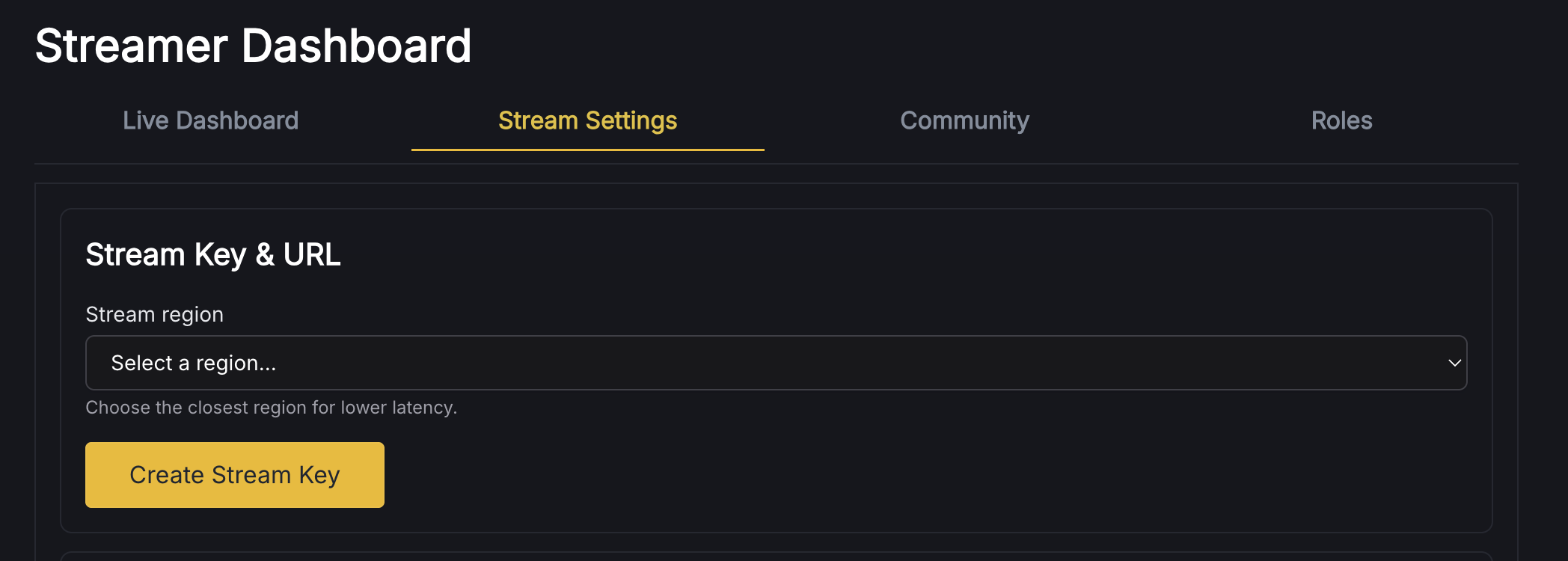
Go to your Streamer Dashboard → Stream Settings → Create Stream Key and pick the region closest to you.
Recommended Encoder Settings (OBS / Streamlabs / vMix)
These settings give the best balance of quality, stability, and low latency across the platform.
VIDEO SETTINGS
1. Codec
- H.264 (AVC)
- Profile: High
- Rate Control: CBR (Constant Bitrate)
2. Resolution & Bitrate Targets
1080p 60fps: 6,000–8,500 Kbps
1080p 30fps: 6,000–7,000 Kbps
720p 60fps: 4,500–6,000 Kbps
720p 30fps: 3,500–5,000 Kbps
3. Keyframe Interval
- 2 seconds
4. FPS Recommendations
- Gaming: 60 fps
- IRL/Talking: 30 fps
AUDIO SETTINGS
- Codec: AAC
- Bitrate: 160 Kbps
- Sample Rate: 48 kHz
- Channels: Stereo
UPLOAD SPEED
Your upload speed should be at least 2× your video bitrate.
OBS QUICK SUMMARY
Output → Streaming
- Encoder: x264 or Hardware (NVENC / Apple VT)
- Rate Control: CBR
- Bitrate: 8000–8500 Kbps (for 1080p60)
- Keyframe: 2
Video
- Base Canvas: 1920×1080
- Output: 1920×1080
- Downscale: Lanczos
- FPS: 60
Backslash Commands: Faster Mod Tools in Chat
Moderation and role management are moving into command speed.
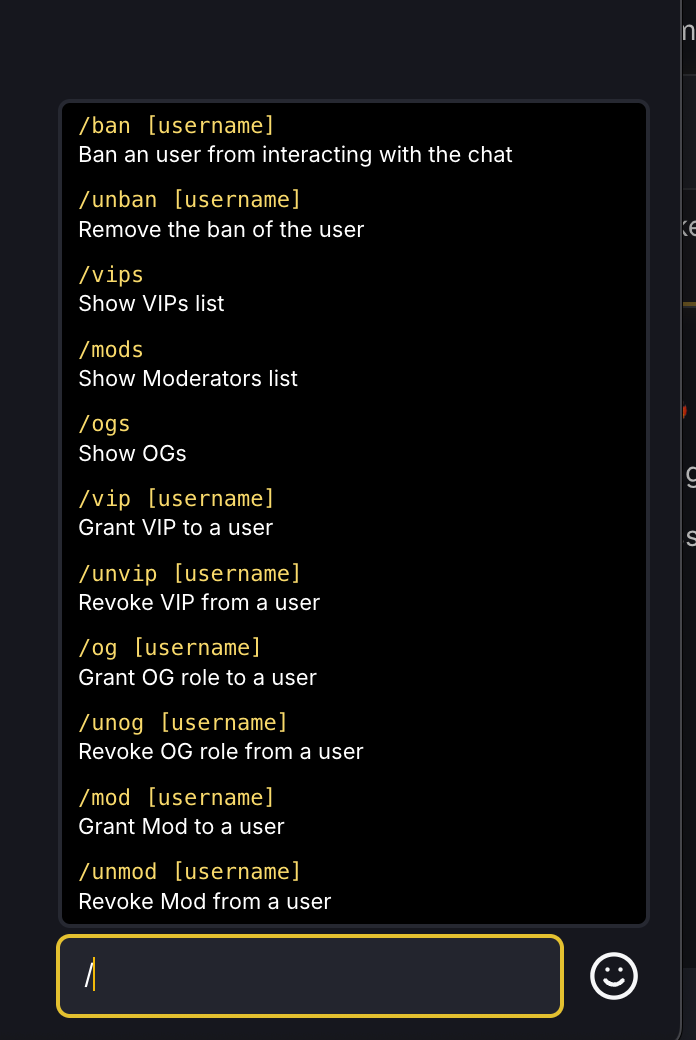
We’ve added a backslash commands tab (help panel) in chat and enabled the following commands:
/vip – grant VIP
/unvip – remove VIP
/mod – grant Moderator
/unmod – remove Moderator
/og – grant OG
/uog – remove OG
/ban – ban a user
/unban – unban a user
/vips – list VIPs in the channel
/ogs – list OGs in the channel
/mods – list Mods in the channel
You can now quickly see VIPs and OGs for your channel and manage them without leaving chat.
New VIP, OG & Mod Badges
Roles now look like roles.
- VIP badges for your trusted regulars.
- OG badges for your day-ones and early supporters.
- Mod badges so it’s obvious who’s helping keep the chat safe.
Badges update instantly when roles are added or removed (see the bug fix below)
This is the first step toward a deeper identity system where status, contribution and history are clearly visible in chat.
Cleaner Chat: Hide Avatars & Show Timestamps
Chat now has basic “power user” view options:
- Hide user avatars – for a tighter, text-first chat layout.
- Show timestamps – see exactly when messages were sent.
This is especially helpful for moderators reviewing conversations and for creators watching VODs and trying to understand how chat reacted at specific moments.
New: Transparent Read-Only Chat for OBS
We’ve added a transparent, read-only chat view designed specifically for stream overlays.
- Opens in a separate browser window.
- Displays chat without input UI.
- Background is transparent so it drops cleanly into OBS.
How to use it:
- Open your Streamer Dashboard.
- Go to the Chat / Overlay section (or channel tools, depending on your UI).
- Click “Open Overlay Chat” and copy the browser URL into OBS as a browser source.
Your viewers get the normal chat; you get a clean overlay on stream.
Bug Fixes & Polishing
A few important fixes went out with this release:
- Fixed: Gifted sub to a specific user not workingGifting a subscription directly to a user now works as expected.
- Fixed: Real-time color updates in chatUsername colors and role-related visuals now update in real time, without refresh or delay.
We’re still in the “ship every day” phase of Blaze.
More regions, smarter community tools and deeper creator economics are already in the pipeline.
If you spot bugs or have feature ideas, ping us in Discord; we do read everything.
Own your stream. 🔥